
Features
A season’s worth of coaching, in one place.
From the summer plan to the last meet. Here’s everything a coach gets, packed in the order you’d use it.
See it in the app
See exactly how a workout grew.
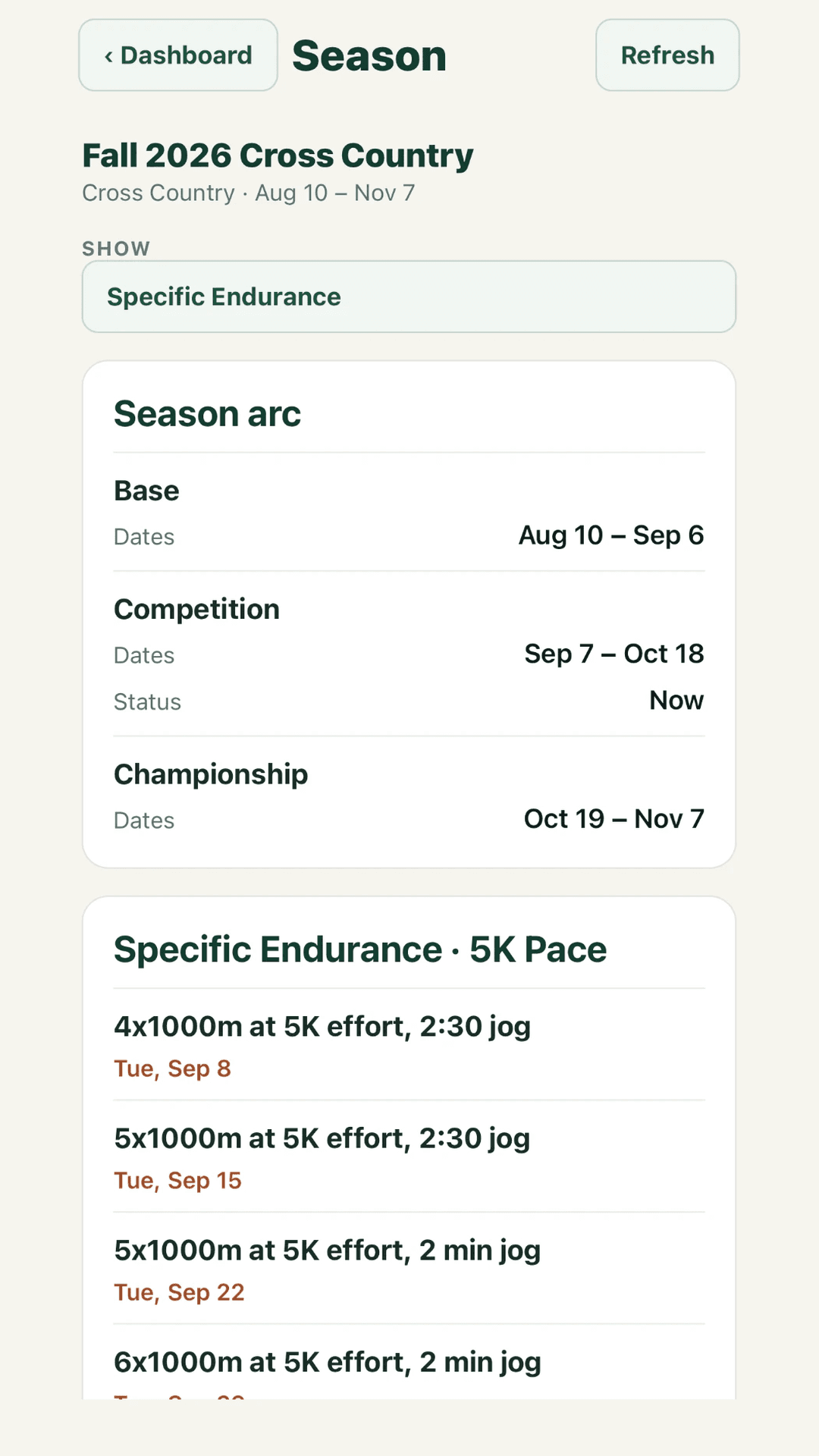
One demo season’s 5K-pace work, in order. Four 1000s with a 2:30 jog on Sep 8. Five on Sep 15. Five again on Sep 22, with the jog cut to 2 minutes. Then six.
One change at a time, each one dated. Next fall it’s a sequence you can copy, change or argue with.
- Phases and meets on one timeline
- Every session of one kind of training, in order
- Progressions saved for next season
One workout. Everyone gets their own number.
Varsity and JV workout
Tuesday, September 15
5x1000m @ 5K pace | 2:30 jog
Run By Numbers
| Athlete | 1Each runner’s own target | 2 | 3 | 4 | 5 |
|---|---|---|---|---|---|
| Lucas Kim | 3:20.1 | 3:20.1 | 3:20.1 | 3:20.1 | 3:20.1 |
| Ethan Brooks | 3:25.1 | 3:25.1 | 3:25.1 | 3:25.1 | 3:25.1 |
| Liam Carter | 3:30.7 | 3:30.7 | 3:30.7 | 3:30.7 | 3:30.7 |
| Noah Bennett | 3:39.1 | 3:39.1 | 3:39.1 | 3:39.1 | 3:39.1 |
| Zoe Coleman | 3:51.7 | 3:51.7 | 3:51.7 | 3:51.7 | 3:51.7 |
| Chloe Ramirez | 3:57.4 | 3:57.4 | 3:57.4 | 3:57.4 | 3:57.4 |
Notes
Same 5x1000, six different numbers. Lucas’s first 1000 is 3:20.1. Chloe’s is 3:57.4. Everyone in between has their own.
The target sits in the corner of each box. The split they actually ran goes next to it. The stopwatch finally has somewhere to report to.
- Targets from each runner’s 1600m time
- The whole practice, warmup to cooldown
- The workout on every athlete’s phone
Hear from every runner, not just the closest three.
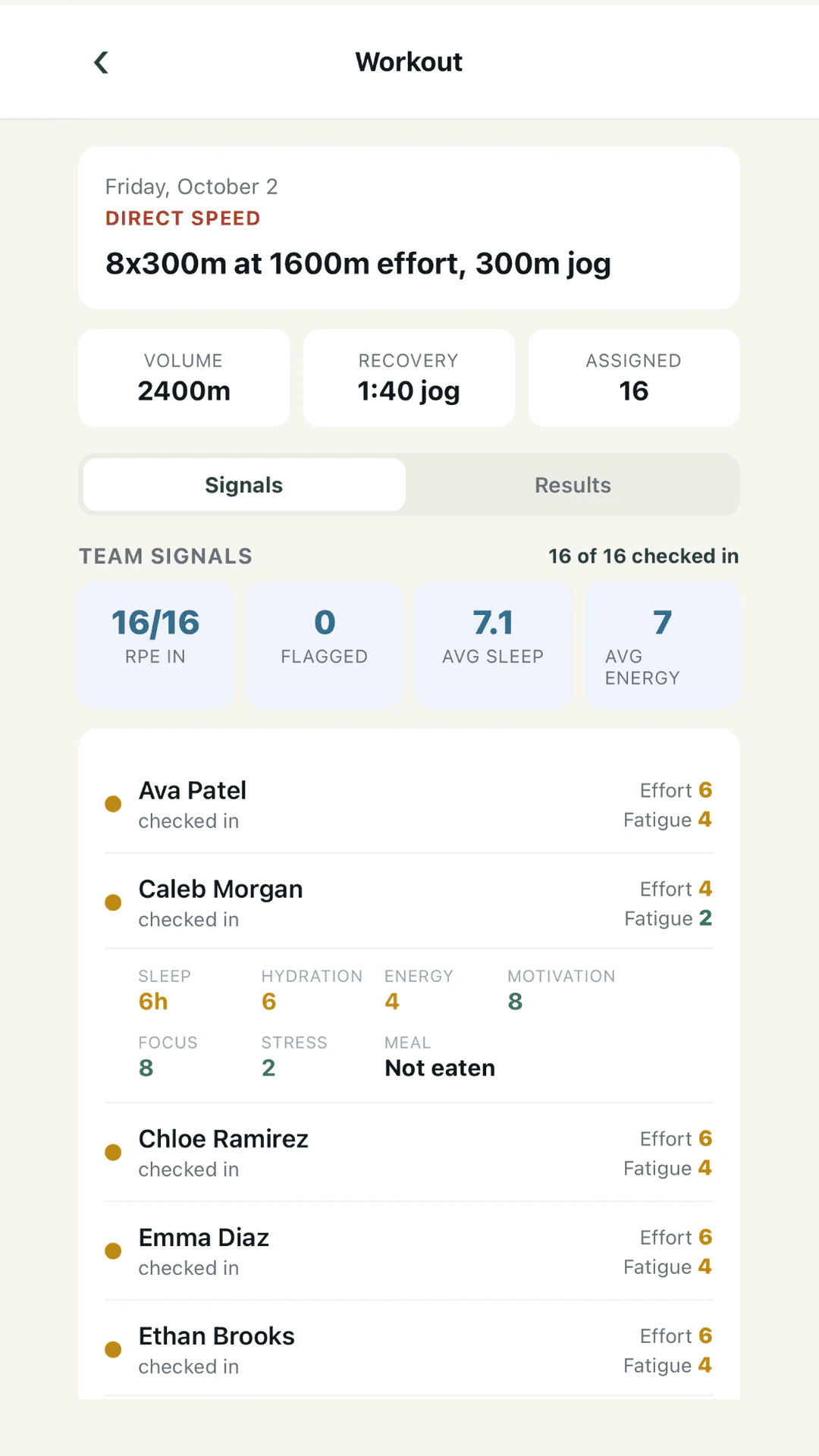
On this Friday, all 16 runners checked in. They rated the effort afterward too, and every answer shows up on the workout, next to the runner’s name.
Caleb Morgan rated it a 4. His check-in says he hadn’t eaten. That’s a quick question before the next workout. What it means is between you and Caleb.
- A quick check-in before practice
- Effort and fatigue from every runner
- Every rep next to its target
See who’s getting better, and who’s quietly slipping.
Season read · Improving?
Are we improving this season?
1 slipping lately · 7 improving · 5 holding · 3 not enough evidence yet
Slipping lately 1
Noah Bennett
+0:38latest race off the season best
Last two 5Ks 19:24 Oct 10 · 19:30 Oct 17
Needs you
The last two 5Ks (19:24 on Oct 10, 19:30 on Oct 17) are both more than 2% slower than the season best (18:52, Sep 26).
Open Noah Bennett →Improving 7
Lucas Kim
−0:29vs first race
Season best 16:51 Oct 17
Ethan Brooks
−0:31vs first race
Season best 17:31 Oct 17
Liam Carter
−0:49vs first race
Season best 17:52 Oct 17
Seven improving, five holding, one slipping lately. Three more don’t have enough races to tell yet. Everybody lands somewhere, with their races drawn underneath.
Noah Bennett’s last two 5Ks are both more than 2% off his season best. The board says exactly that. Whether it means anything is your call.
- Who’s improving, holding or slipping, and why
- Workouts and races on one trend
- One rough workout, in context
Three check-ins in a row is a pattern. Now you’ll see it.
Analytics
What does the recorded data tell you?
As of Oct 16.
2
athletes to check on
3
check-in answers line up with workouts
Check on
Ava Patel
Oct 13 – Oct 16
Ava Patel hadn’t eaten before the workout on 3 check-ins in a row. Worth asking about eating before practice.
See the check-ins
What a check-in tends to say about the workout
- Ava Patel had a bad day 4 of 5 times without eating first, and 0 of 6 times after eating.
- Noah Bennett’s RPE ran about 1½ higher after under 6 hours of sleep than after 7 hours or more (4 of 5 times above usual).
Ava Patel hadn’t eaten on three check-ins in a row. RBN lists her under Check on with that reason in plain words, and the dots mark which check-ins.
Asking her takes thirty seconds. After you talk with her, record it on the follow-up board, so your assistants know it’s been handled.
- Who to check on, and why
- Check-in answers that line up with slow days
- A board for runner conversations
The average was 19:40. The spread was 42 seconds.
Top 5 avg
19:39.6
Pack gap 1–5
0:42
- Liam CarterPredicted 17:3317:20Faster than predicted
- Zoe ColemanPredicted 19:1919:17As predicted
- Maya TorresPredicted 20:1120:26Slower than predicted
Your top-five average and the gap from first to fifth, side by side. So the race where the average looked fine but the fifth runner was way back doesn’t slip by.
Liam beat his prediction by 13 seconds. Maya ran 15 slower. Both are worth a word on the bus.
- Top 5 average and pack gap
- Predicted vs. actual times
- Races, entries and relays
The workout reaches every runner before you do.
Hi Maya
1600m focus
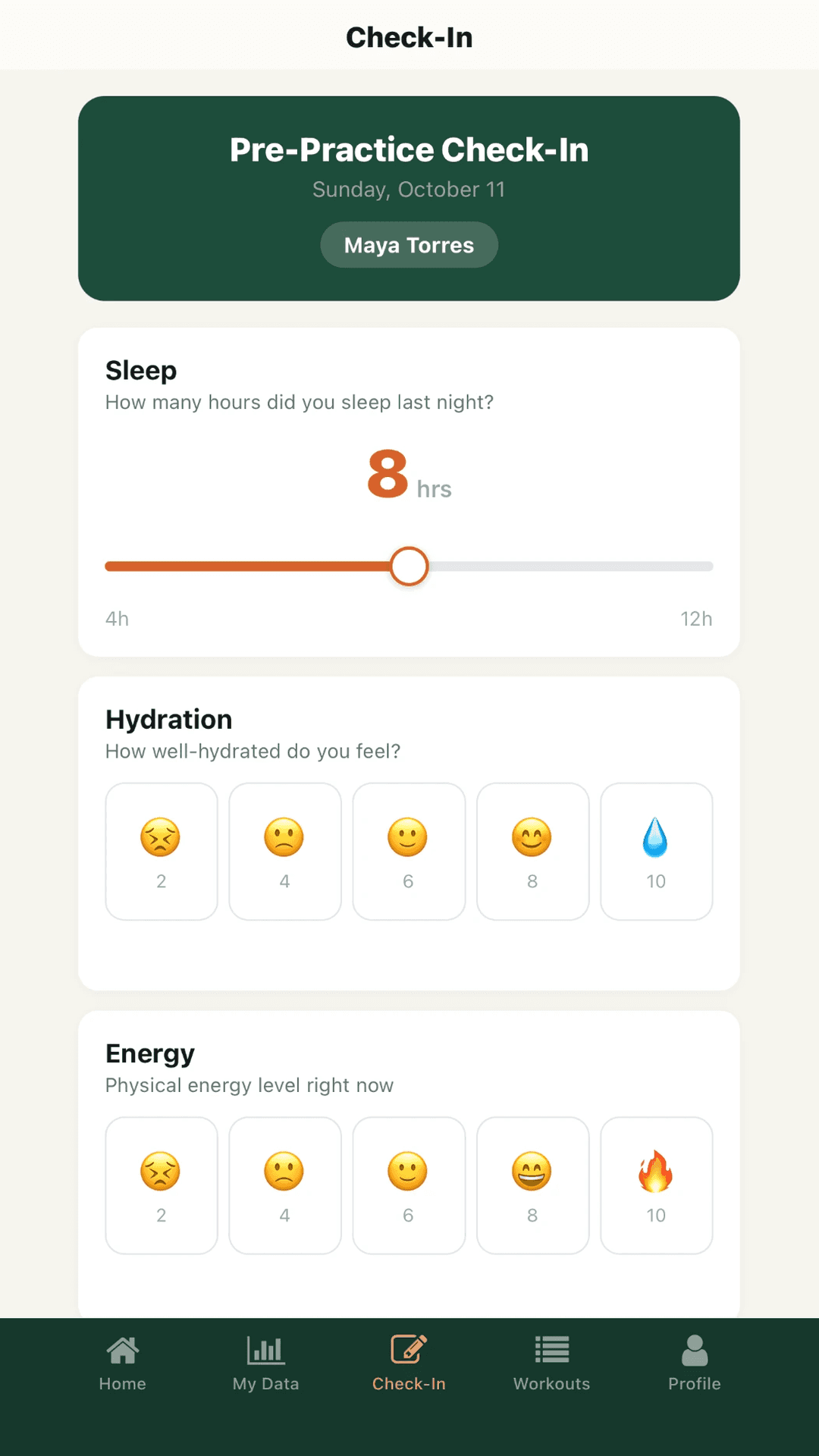
Pre-workout check-in
Let your coach know how you’re feeling before today’s workout.
Today’s workout
5x1000m @ 5K pace, 2:30 jog
1000m · rep 14:02.3
1000m · rep 24:02.3
1000m · rep 34:02.3
1000m · rep 44:02.3
1000m · rep 54:02.3
Your target splits · tap for details
This is Maya’s phone. Today’s five 1000s, with her target for each one: 4:02.3. Her teammates see theirs.
Your assistants get their own logins. Results go in without waiting for you to find a laptop.
- A free app for your athletes
- Logins for assistant coaches
- The coach app on your phone
The packing list
- Plan the season
- Phases and meets on one timeline
- Weeks left in each phase
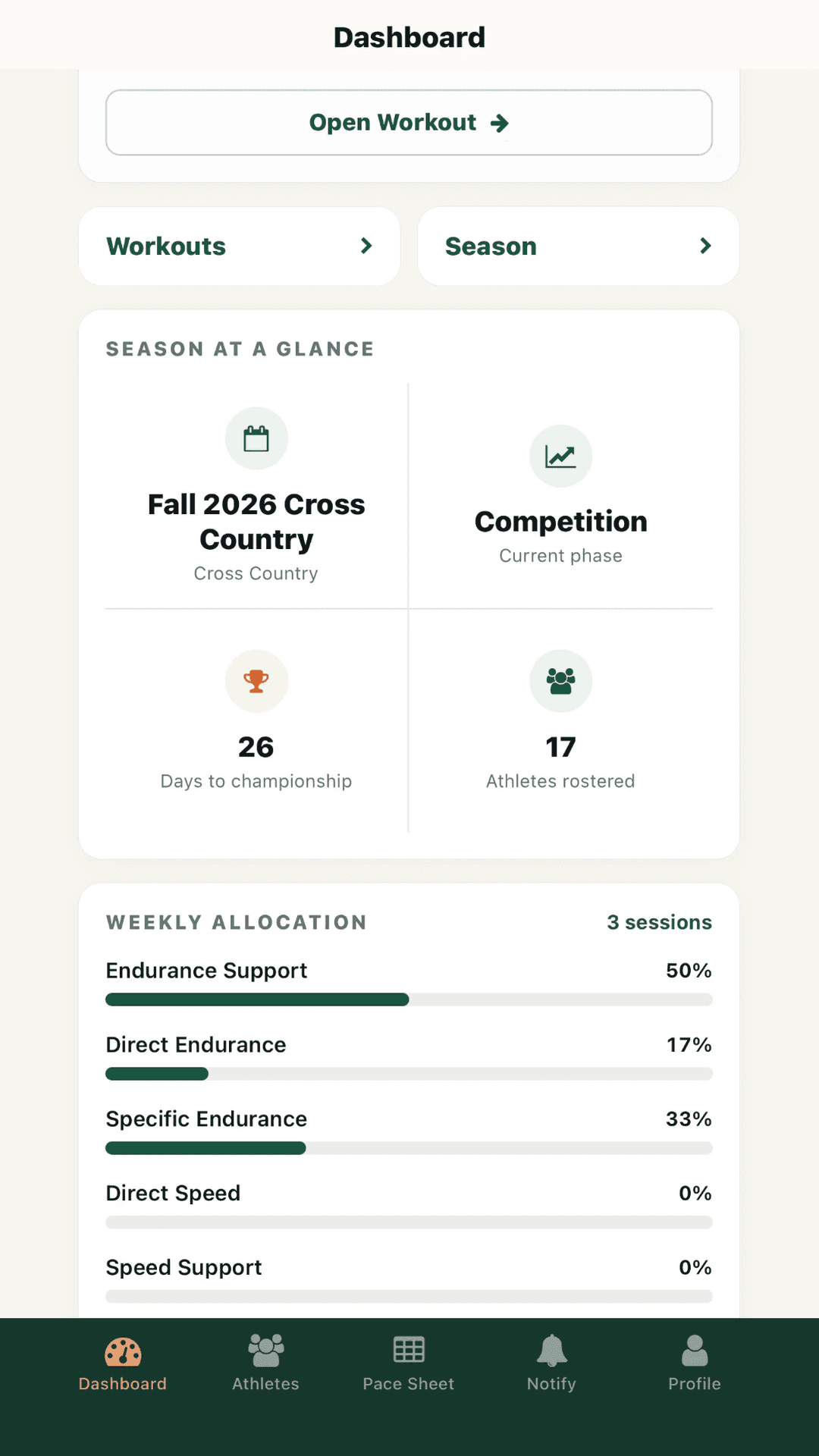
- A training mix that adds up to 100%
- What you tried, and how it went
- Progressions saved for next season
- Prepare practice
- Every runner’s own targets
- Every part, warmup to cooldown
- Recovery for every step
- Training groups and who’s assigned
- Weather and heat adjustments
- Practice and pace sheets to print
- Capture the response
- Every rep next to its target
- Effort and fatigue ratings
- A quick check-in before practice
- Buttons to send reminders
- Requests sent for you
- See progress
- One rough workout, in context
- Patterns across recent workouts
- Workouts and races on one trend
- Who’s improving, holding or slipping
- What each season actually held
- Weekly work at 5K pace
- A check on the current phase
- Follow through
- Who to check on, and why
- Check-ins that match slow days
- A board for runner conversations
- Meets
- Races, entries and relays
- Predicted vs. actual times
- Top 5 average and pack gap
- Each runner’s recent race level
- Staff and athletes
- Logins for assistant coaches
- A free app for your athletes
- The coach app on your phone
Safety pins not included. There are forty at the bottom of your team bag anyway.
Build your own Features page
Tap the ones that sound like your week. They stay open, the rest fold down to a line, and your lap gets shorter. Open anything again whenever you like.
Nothing picked yet, so you’ll see every section.
Plan the season
Remember what worked last season, and why.
Every summer you rebuild the season from memory. That progression worked great last year. What was it? How many weeks did it run? What did you change?
RBN keeps the season in one place. The phases, the meets, the progressions you ran and what you were trying. Next year you start from what you actually did.
What you get
- Phases and meets on one timeline, so you can see what one more week of base would push into
- The current phase and how many weeks are left, right on your dashboard
- A season mix by type of training that has to total 100. It cannot become 113 because several ideas turned out to be important.
- A place to name what you’re trying this season, write down why, and write a reflection when it’s done
- Progressions you design week by week: the workout, what changed, where it’s headed, and your notes
- A library of the progressions you’ve saved, ready to reuse next season
- Season goal: set the team’s goal for the championship and see the evidence for it all season.
The longer story“Spring Progression Final 3”
Future you may remember the general idea of a progression. Future you is also capable of staring at a saved workout called “Spring Progression Final 3” as if it were a message from a civilization that left no dictionary.
So write the reason down while you still have it. Each week of a progression has room for what changed and why, and where the whole thing is headed.
Last time it was four 600s. This time it’s five, a little faster, with shorter recoveries. That’s three changes wearing one jacket. The work went from 2,400 to 3,000 meters, which is 25 percent more, before anybody touched the pace. A saved progression puts each step side by side, so you can see what you actually changed.
Pull it out next season and decide what still makes sense for the runners you have now. Last year’s runners weren’t recruited to prove this year’s plan correct.
Prepare practice
Walk out to practice with every runner’s number already done.
It’s a few minutes before the workout. Somebody wants to know if the recoveries are jog or standing. Somebody else wants their 400 pace.
The first question is your department. The second shouldn’t have to be.
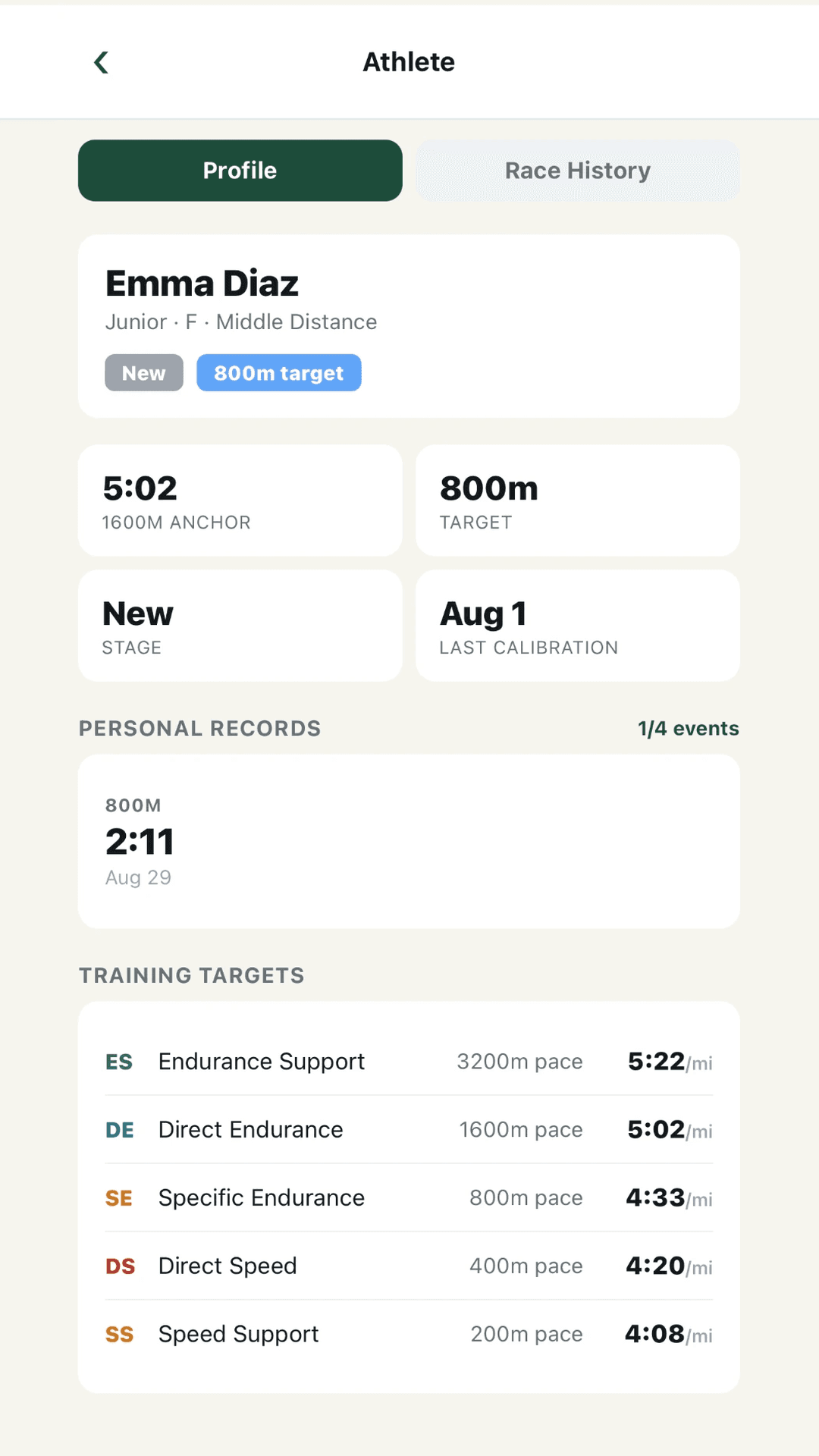
You choose the work. RBN does the math. Every runner’s target splits come from their own 1600m time, on a sheet you can print. You spend the warmup explaining the workout, not calculating it out loud.
What you get
- Individual targets for every runner in a shared workout, so the group stays together
- Pace for each step, set as a percentage of race pace
- The whole practice, not just the main set: warmup, sets, alternations, fartlek, strides, easy running, race and cooldown
- Recovery for every step
- Training groups, and assignments by group or by athlete
- Notes on the workout and the planned mileage
- Temperature, humidity, weather, wind and dew point saved with the workout, so next month you know it was 88 and humid
- Heat-adjusted targets when you want them. Results are still judged against the plain targets.
- A printable practice sheet with every runner’s splits, fastest first
- A roster pace sheet with every runner’s five training paces on one page
- Duplicate an old practice as a starting point
- The workout on every athlete’s phone, with their own target splits for every rep
- Targets that keep up: a faster race updates them on their own. When workouts suggest a change, RBN recommends it and you decide.
The longer storyThe paper clip joins the coaching staff
The workout is ready. The targets are worked out. The practice sheet is printed.
Then a gust of wind sends your beautifully prepared work down the track. You go get it, along with a new appreciation for the paper clip.
That’s the setting I care about. Not the screenshot where the desk is clean and nobody has asked a question yet. Practice, where you’re explaining the workout, watching the runners and checking a target while somebody waits for an answer.
Can you find the athlete? Can you read the target? Is what you need actually on the sheet? If the sheet helps you answer a runner’s question and get back to watching, it did its job.
Bring a clip, too. I haven’t found a mathematical solution for wind.
Capture the response
Splits on a clipboard last about a day.
By next month, the sheet is gone. It’s in a bag, a car or a recycling bin, along with everything the runners told you about that workout.
Enter the results once, on the web. Each recorded split sits beside that runner’s target, along with their effort rating and the check-in they sent before practice.
When you want that workout again in the spring, it’s all still there.
What you get
- A results grid for every workout, with edits when you mistype
- Completion-only parts for the stuff you don’t time
- A record of who was held out, so a missing rep doesn’t look like a bad one
- Effort and fatigue from each athlete after the workout, plus a note
- A check-in before practice: sleep, hydration, energy, motivation, focus, stress and when they last ate, plus a note
- Soreness and illness questions, off unless you turn them on
- A clear mark on any effort rating you entered yourself
- Buttons to push the workout, ask for a check-in, ask for effort ratings and send a reminder
- For the request you remember halfway home: check-ins sent before timed workouts and effort ratings after, at times you pick. Nobody gets asked twice.
Athlete results (2)
| Athlete | Rep 1 | Rep 2 | Rep 3 | Rep 4 | Rep 5 | Signal |
|---|---|---|---|---|---|---|
| Liam Carter | 3:30.73:30.4 | 3:30.73:30.9 | 3:30.73:29.8 | 3:30.73:30.2 | 3:30.73:29.5 | Controlled |
| Sofia Nguyen | 3:30.73:30.6 | 3:30.73:30.7 | 3:30.73:30.1 | 3:30.73:29.9 | 3:30.73:29.7 | Controlled |
Athlete RPE — 16 of 16 responded
| Athlete | Effort | Fatigue |
|---|---|---|
| Liam Carter | 4 Easy | 4 |
| Sofia Nguyen | 10 All out | 8 |
The longer storyThe average was exactly right
The reps were 1:42, 1:46, 1:52 and 2:00. The average is exactly 1:50. Mathematically, an excellent afternoon.
The average isn’t lying. It’s just being remarkably discreet about the last rep.
That’s why every rep goes in, and why the effort rating sits right beside them.
Your athletes
Your runners know their splits before they get to the line.
Nobody’s reading targets off a clipboard to a crowd. Every runner sees their target split for each rep on their phone.
They check in before practice and tell you how it felt after. When they want to know whether they’re getting better, My Data shows their PRs, training paces and race history.
What they get
- Their target splits for every rep
- A quick check-in before practice
- Effort and fatigue after the workout
- My Data: their PRs, training paces, pace landscape, capacity profile and race history
- A notification when you push a workout or ask for something
What you get on your phone
Look up a pace or push the workout from wherever you’re standing.
- Your dashboard, your athletes and the pace sheet
- Push workouts and ask for check-ins and effort ratings, with a record of what was sent
- Results entry, patterns, follow-ups, printing and planning are on the web
See progress
Show the progress one workout can’t.
One workout tells you about one afternoon. Your questions are bigger. Is this runner getting better? Does she fade on the last reps every time, or just today?
RBN puts each runner’s recorded workouts and races on one 1600m scale. You can answer those questions for everyone on the roster, not just the runners you happened to watch closely.
What you get
- Bad workout or just a bad day? One rough session next to the runner’s recent workouts and what they reported
- Recent workout patterns. A runner’s last eight workouts, including whether they keep fading late and how they do on short reps compared with long ones. “Good” and “bad” turn into something you can actually talk about.
- Progress across the season. Workouts and races on one 1600m scale, so you can see a trend even when races are weeks apart. The races behind the estimate are listed.
- An improvement board. Every runner in Improving, Holding, Slipping or Not enough evidence, with the reasons spelled out. The runner sliding quietly in the middle of the pack shows up too.
- The season training ledger. What a runner’s season actually contained, by type of training, with miles assumed from the plan labeled as assumed, and sessions marked missed or held out left out
- Specific endurance. Weekly distance at 5K pace and weekly minutes of 5K-effort fartlek, in separate graphs, so switching from reps to fartlek doesn’t look like more or less work
- Current phase review. Is this phase doing what you planned? Whether runners are hitting their targets, the pack gap, how many effort ratings came in, and a “How this was read” note that shows what counted.
- Race history. Every race by season, so a returning runner’s “where do I start?” has more behind it than their best race
- Pace landscape. Each runner’s paces from 800m to the marathon
- Capacity profile. Shows up once a runner has PRs in at least two events. Until then, it says it doesn’t have enough.
Zoe Coleman
Bad workout or just a bad day?
5x1000m @ 5K pace
Tue, Sep 22 · slower than target
The next workout (Sep 24) was back on target.
How this is decided
- Only slower-than-target workouts get this read.
- “Just a bad day” needs an on-target or fast day in the 21 days before.
- A pattern is 3 of the last 4 measured workouts slow within 21 days, the same rule as Slipping lately.
- The next day of workouts that isn’t mixed (within 21 days), or a race in the 7 days after compared with the time the anchor predicts, updates the read.
The longer storyThe first rep has excellent public relations
Everyone remembers how quick the first rep looked. It’s been mentioned twice on the walk back. If anybody asks how the workout went, it would happily nominate itself.
The last reps would like a representative.
The first rep can keep the compliment. It just doesn’t get to write the review for all the other reps.
Follow through
See what happens outside practice. Then talk about it.
Sleep, stress and an empty stomach never show up on a stopwatch. Runners report them in check-ins. RBN compares those answers with workout results and effort ratings, and flags the ones that keep showing up on a runner’s slower or harder days.
After you talk, record it on the follow-up board. You and your assistants can see what was discussed and what still needs attention. Next week you aren’t starting from “I think I talked to her about this.”
A flag is something worth asking about, not an explanation. The explanation still comes from you and the runner.
What you get
- Check on. Before practice, the runners whose last three or more check-ins in a row show the same thing: high stress, short sleep, low energy, or not eating before practice. Enough to start a short conversation before the warmup.
- Links. A check-in answer that keeps showing up on a runner’s slow days or on efforts harder than their usual, with the workouts behind it one click away
- Follow-ups. A board for the conversations: New, Talked with them, Watching, Resolved. Every step records which coach did it. Coaches only. It isn’t shown in athlete accounts.
As of Oct 16.
New1
Ava Patel
Check on · food · Started Oct 13
Ava Patel hadn’t eaten before the workout on 3 check-ins in a row. Worth asking about eating before practice.
See the check-ins
Talked with them1
Noah Bennett
Link · sleep, RPE · Started Oct 9
When first acted on (Oct 10): Noah Bennett’s RPE ran about 1½ higher after under 6 hours of sleep than after 7 hours or more.
Talked with them · Oct 10 · Coach Morgan
See the check-ins
Watching1
Maya Torres
Check on · stress · Started Oct 2
When first acted on (Oct 6): Maya Torres’s stress has been 7 or higher for 3 check-ins in a row. Worth a conversation.
Watching · Oct 6 · Coach Ellis
See the check-ins
Resolved1
Ethan Brooks
Check on · sleep · Started Sep 18
When first acted on (Sep 22): Ethan Brooks has slept under 6 hours for 3 check-ins in a row. Worth asking about sleep.
Resolved · Sep 29 · Coach Ellis
See the check-ins
The longer storySomebody already had the conversation
Your assistant talked to a runner on Tuesday. You meant to on Wednesday. Because it’s on the follow-ups board, you know it happened, who did it, and what they wrote down.
The runner doesn’t have to give the same update to every adult with a stopwatch.
Nothing dramatic happened. No secret training method was uncovered. Two coaches managed to know about the same piece of coaching. I have a soft spot for that level of technology.
Meets
The meet has one name. Your questions are more specific.
Who’s in the 3200? Which warmup goes with which race? Who’s on the second leg?
Build the meet once. Every race in order with its own warmup, every runner’s entries, and relays with their legs, written down before the bus leaves.
Afterward, see how it went. Compare each runner’s time with the finish their pre-meet 1600m anchor predicted, see who’s racing well right now, and check how tight your top five was.
What you get
- A meet with all its races in order, each with its own warmup and cooldown
- An entry grid: every runner down one side, every race across the top
- Relays: 4x800, 4x400, DMR and SMR, with legs assigned. Relay splits never count as individual PRs.
- Weather for the whole meet, with a different reading for any race
- Results entered race by race
- Predicted finishes for individual 800m, 1600m, 3200m and 5K races, estimated from each runner’s working 1600m anchor as it stood before meet day, shown against the times as run with faster and slower marked. No anchor before meet day means no prediction, and relays aren’t predicted.
- Top 5 average and the pack gap from first to fifth, when five runners finish the same race
- Recent race level, from the middle of each runner’s last three races in an event within six weeks
Saturday, Oct 24 · Fall 2026 Cross Country
Lakeshore Invitational
2 races · 5K17 entered
Races
Open a race for its splits and RPE
Girls 5K
| Athlete | Predicted finish |
|---|---|
| Zoe Coleman | 19:19 |
| Chloe Ramirez | 19:47 |
| Maya Torres | 20:11 |
| Sofia Nguyen | 20:36 |
| Lily Chen | 21:04 |
| Ava Patel | 21:32 |
| Grace Sullivan | 21:57 |
| Emma Diaz | 22:49 |
The longer storyThe bus ride is a poor database
On the bus, you hear three race times, a story about somebody’s finish, and a request to stop for food. Ten minutes later, the food request is the only item with universal agreement.
Loud has an excellent reputation for sounding official. It has a less impressive relationship with accuracy. Put the times in the meet, race by race, including the quieter ones that didn’t become the bus story.
Staff and athletes
Share the work without sharing a brain.
Your assistants already see things you don’t. They’re with the 800 group while you’re with the 5K kids.
Give them their own login. They can enter results, send requests, invite athletes and work follow-ups. The plan stays with you.
Assistant coaches are included on every plan, the free trial too.
What you get
- Assistants sign in with their own Google account. Nobody shares a password.
- They see the whole team.
- They can enter results, send check-in and effort requests, invite athletes and work follow-ups.
- Changing workouts, athletes and seasons stays with the head coach.
- Invitations expire after 14 days.
Coaching staff · 3
Who coaches with you
Assistants see everything and can log results and send check-ins, but only you can create or change workouts, athletes, and seasons.
- Jordan Ellis (you)jordan.ellis@example.comHead coach
- Casey Morgan casey.morgan@example.comAssistant
- Sam Rivera sam.rivera@example.comAssistant
Invite an assistant
Send the link to your assistant. They sign in with their own Google account to join. No shared password.
The longer storyA regrettably large search area
An assistant entering results notices that a runner keeps finishing well ahead of the targets. They can’t change the runner’s anchor. They can bring you the sessions.
I’d much rather get “look at these sessions” from an assistant than try to decode “I think something was different with somebody.”
That last one covers a regrettably large search area.
What’s not in here
- Sprints and field events. Not yet. Right now it’s built for distance: 800m and up.
- Training plans. You bring the workouts. There are no built-in plans.
- Watch and GPS imports. Results are entered by hand.
- Importing old results. Last year’s notebook stays a notebook, unless you type the races in.
- Team admin. Buses, dues and permission slips belong to some other software.
- Your stopwatch. Keep it. Somebody still has to time the reps.